Boarding locations
It is often the case that the coordinates of stops are relatively far away from where the passengers are expected to the wait for the vehicle.
A good example of this is Buckhead subway station in Atlanta.
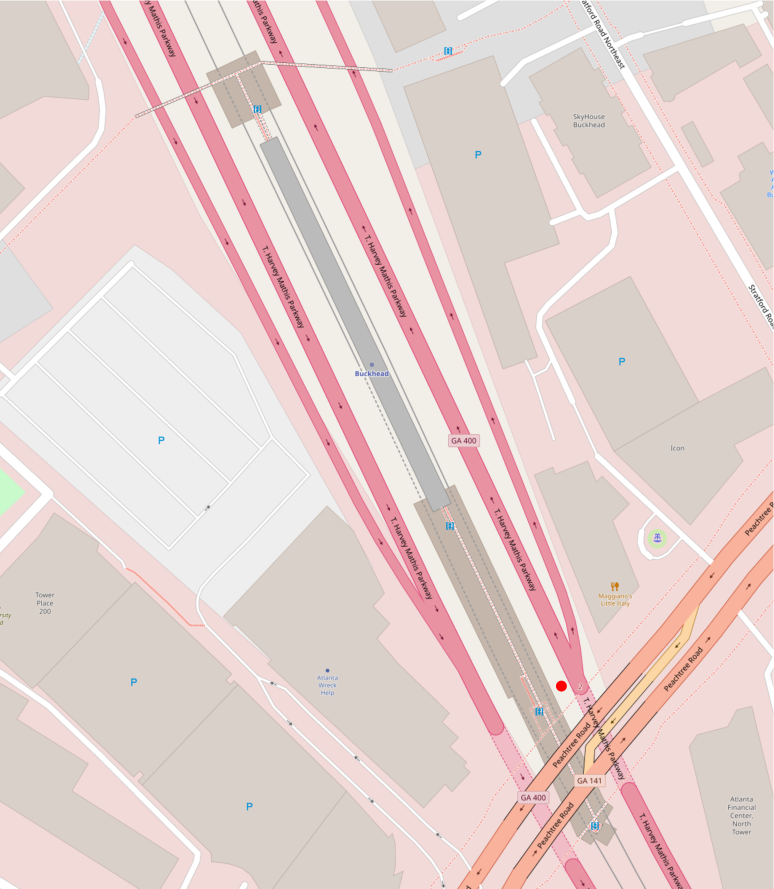
There the coordinates of the stop in GTFS are located near Peachtree Road so OTP would instruct passengers to wait on the street rather than walking down the stairs to the platform.
OSM tagging
We can correct the waiting location for the passenger by adding some tags to OSM which help OTP decide to correct the location. In general, you should familiarise yourself with the OSM wiki page on public transport.
You can add cross-references to a stop's id or code on all OSM entities (nodes, ways, relations) which have one of the following tag combinations:
public_transport=platformrailway=platformhighway=platformhighway=bus_stoprailway=tram_stoprailway=stationrailway=haltrailway=platform_edgeamenity=bus_stationamenity=ferry_terminal
Notes
public_transport=stop_locationandrailway=stopare explicitly not on the list as they denote the place where the train stops, not the waiting area.- The
railwaykey is deprecated (even though still widespread) and you should usepublic_transportinstead. - OTP does not process isolated nodes, but only nodes, which are part of routable ways. Therefore,
adding a single , isloated boarding location node to OSM has no effect. There is an exception,
though: isolated nodes, which are members of
public_transport=stop_arearelation, will be considered and automatically linked with the street graph. For more information, check the stop area documentation.
Cross-referencing
In order to tell OTP how to link up the OSM entities to the stops you need to add a ref tag whose
value is the stop's id or code.
However, tagging conventions vary from location to location so other tags can be configured, too.
For example, there is a country-wide stop reference system in Germany called
IFOPT and
therefore if you want to use it to match stops
(example platform), add the following to
build-config.json:
Multiple stops on the same platform
Some stations have a middle platform with a stop on either side of it. In such a case, you have two possibilities:
- Add two or more references separated by a semicolon, as seen in this example.
- Use several ways tagged with
railway=platform_edgeas seen here.
Where the stop ends up
A matched stop has two candidate positions: the one in the OSM data and the one in the transit data. By default OTP uses the OSM one, so every stop matching a platform shares a single point at its centre. Walking between those stops is then free however far apart they really are, and every walk to or from the platform starts at that centre rather than at the stop.
Set coordinateSource to transit to keep each stop where the transit data puts it, connected to
the platform by a walk of the real distance:
This is only worth doing where the stop coordinates in your transit data are at least as accurate as the OSM features. A stop more than 5 m from the feature it matches is reported as a data import issue, which is a good way to find out which of the two is misplaced.